
PUMPCX QAI
QAI is the First Conversational Interface for CX Assurance
Schedule a 10-minute demo to see it live
QAI is the new natural language UI that lets you test, monitor, and report using the PumpCX assurance platform, as easily as typing a request.
SEE IT IN ACTION
In just 10 minutes, we’ll show you just how easy it is to use PumpCX with QAI
Type what you want to test. QAI builds the test case, runs it, and explains the results in plain English. One prompt. Done. Book a 10-minute demo to see it for yourself.
INTRODUCING QAI
Just ask. PumpCX answers.
QAI is the new way to work with PumpCX. Instead of navigating menus, you tell the platform what you need. It builds the test, runs it, and explains the results in plain English.
It's the first and only conversational interface in the CX assurance market, built for speed and ease of use.
85%
Reduction in test cycle time*
*Estimate based on average customer usage data and testing cycles
One prompt. Three things happen.
-

You ask
Type what you need in plain English. No special syntax. No template to fill in. Just describe the test you want to run or the question you need answered.
-

QAI tests
QAI builds the right test cases, runs them against your systems, and processes the results automatically. You don't touch a configuration screen.
-

You get answers
Results come back in plain English — not log files, not a dashboard to interpret. Readable by a QA engineer and a CX director alike.
AVAILABLE NOW IN PUMPCX
QAI is part of the PumpCX platform—No extra cost or separate subscription
QAI is a new interface built into the PumpCX platform. The existing browser UI stays exactly as it is. Your team can use QAI, the standard interface, or both — whichever UI fits how they work. There's nothing to install, nothing to configure, and no separate license to request.
QAI empowers you to work the way you want
Both QAI and the standard PumpCX browser-based UI are fully supported. Use the interface you prefer, or switch between them for different tasks.
Existing test cases, schedules, and configurations remain unchanged.
QAI can access and build on everything already set up in your PumpCX environment.
HOW IT WORKS
Here’s what you can ask QAI
These are examples of real requests teams can type into QAI. Each one is a complete instruction. QAI figures out what to run and handles the rest.

-
"Book a flight on ABC Airways from Melbourne to Perth, Saturday departure, Friday return. Economy class, aisle seat, morning flights. Assert that all booking parameters are confirmed."
QAI builds and runs a full, end-to-end test. It returns a pass/fail and a plain English summary of the results.
-
"Which carriers degraded voice quality last week?"
QAI runs carrier quality tests across your environment and tells you what it found.
-
"Create a report that highlights those test cases in the Reserv_Tests folder that ran without errors last week that are having errors this week."
QAI generates a custom report tailored to your specified parameters, retaining prior knowledge of your system and preferences.
-
"Compare our AI agent containment to last quarter."
QAI pulls the data, runs the comparison, and explains the difference.
-
"Map the IVR on [phone number] and build test cases for each path."
QAI calls the designated number, maps the call flow, and generates a complete test suite.
-
"Generate 50 prompt variations for our flight booking agent and run them all."
QAI produces utterance variations across sentiment, missing data, and input order. Then it runs every one.
“I wish I could just ask my CX system to ______”
QAI reduces the CX assurance learning curve to a flat line.
Instead of teaching teams how to use the platform, we taught the platform to understand natural language. Simply ask a question or make a request, and QAI figures out which calls to make and performs the operations.
We didn’t remove menus. We just made them optional.
Everything PumpCX does. Now accessible by prompt.
QAI covers the full range of PumpCX functionality, including the capabilities teams use most.
-

IVR and voicebot testing
Give QAI a dialable number and it maps your IVR structure and builds DTMF test cases automatically. No scripting, no diagramming — just a phone number and a request.
-

Agentic AI testing
QAI generates interaction prompts and assertion sets from a user story, then varies them across sentiment, missing data, and reordered inputs. More than 50 utterance variations per scenario.
-

Business performance questions
Ask QAI about carrier quality, containment rates, or quarter-over-quarter performance. QAI runs the right tests and returns plain English answers, not raw data and dashboards.
LEARN MORE
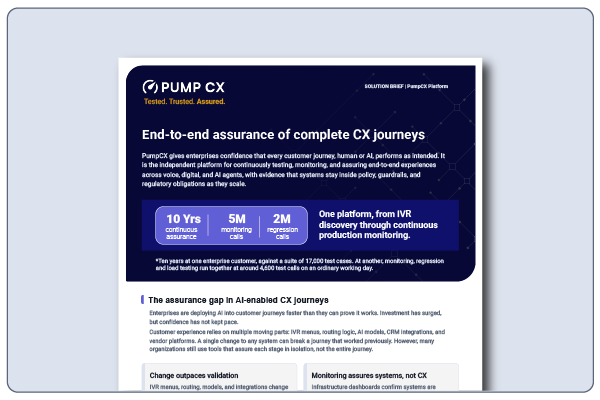
Solution Brief: End-to-end assurance of complete CX journeys, powered by QAI
Download your copy of the PumpCX Assurance Platform solution brief to see how QAI enhances the way PumpCX delivers tested, trusted, assured customer experiences.
QAI works for every role that touches CX quality
CX operations leaders
Stop reading dashboards. Ask QAI the questions that matter — carrier quality, containment rates, quarter-over-quarter comparisons — and get answers you can take straight into a meeting.
QA and testing engineers
Build full test sets, set schedules, and get email alerts through a conversation. No UI navigation, no configuration screens. More time testing. Less time operating the tool.
IT and platform architects
QAI runs on PumpCX APIs, an LLM, an MCP layer, a Skills file, and a Gherkin RAG file. No proprietary black box. The existing browser UI is untouched and fully supported.
See how QAI works in real time
Book a 10-minute live demo. We’ll show you QAI building and running tests against a real CX environment, and answer any questions about how it fits into your QA workflow.
Already a PumpCX customer? Log in to access QAI in your portal.